
Sitemap Guide: Creating, Configuring, and Optimizing Your Sitemap
Sitemap protocol is one way to influence how search engines index your site. Just like with robots.txt and meta tags, you can specify in the file how you want bots to crawl your site and what should be indexed.
What is a Sitemap
A sitemap is typically understood as an XML file that contains a list of pages on your site and minimal information about them. This list helps search engine bots understand the structure of your site and which pages are prioritized. Based on this information, Google and other systems can more effectively index your site.
Some websites also have an HTML sitemap, which lists all the pages as regular links. This can be useful if your site has a complex page hierarchy and you want to make it easier for visitors to find them, but we recommend setting up a user-friendly navigation instead. HTML sitemaps do not affect scanning, indexing, or SEO — it's better to focus on the XML file for successful interaction with search engines.
How a Sitemap Helps with Indexing
A sitemap is one of the tools that allows you to communicate with search engine bots (crawlers). It’s not mandatory, but without it, crawlers might start scanning your site in a random order and could miss some links. This can happen if there are many pages and the internal linking is far from ideal.
Here’s what you can achieve with a sitemap:
- Speed Up Processing. The sitemap indicates to bots where new or recently updated pages are located.
- Increase the Chance of Canonical Page Recognition. If the address of a page with duplicate information elsewhere on the site is listed in the sitemap, search engines will consider it the original source.
- Provide Additional Instructions. You can specify additional page parameters in the sitemap that affect how bots process it: the last modification date, update frequency, and scan priority.
- Track Statistics. By uploading the sitemap file to Google Search Console, you can keep track of the links that have already been indexed.
When to Use a Sitemap
A sitemap is not always necessary and is often seen by search engines as a secondary tool. To rank effectively, most relatively small sites will benefit from developing a user-friendly navigation menu and adding mutual links to all the necessary pages.
For landing pages, business card sites, and other compact resources, a sitemap is rarely needed. However, for larger portals, an XML-file structure can be necessary to simplify the work for search engine bots and direct them on the right path.
Google identifies three categories of sites for which a sitemap is relevant:
- Large Sites with Many Pages and Complex Structures: These sites benefit from a sitemap to help organize and prioritize their extensive content.
- Sites with Poor Internal Linking: If a site has isolated pages that are hard to link internally, a sitemap can help ensure these pages are found and indexed.
- Portals with Regularly Updated Pages: News sites and similar platforms benefit from a sitemap to keep track of frequently changing content.
Additionally, sitemaps are useful for very new sites and projects with a large number of dynamic pages and multimedia files. In these cases, a sitemap allows you to set the necessary scanning priorities instead of relying on random algorithms.
How to Create a Sitemap File
Let's go over the rules you should follow when formatting a sitemap. Like other similar protocols, XML files have their own syntax and requirements for formatting, location, and document size. You can read all the instructions for working with the file in the official guide.
Sitemap File Requirements
An incorrectly created sitemap can be misunderstood by search engine bots, and some errors can lead to them not seeing it at all. To prevent this, you should adhere to uniform rules and recommendations.
- The file can be named anything, although the standard name sitemap.xml is most commonly used for convenience. The mandatory requirement is to use only Latin letters and the XML format.
- Only Latin letters and Arabic numerals in UTF-8 encoding are allowed for the name and content of the file. Some characters (quotes, &, and <>) need to be masked according to a standard.
- Adhere to the correct syntax when specifying links.
- The XML file can only contain pages from the directory where it is located. Therefore, it is recommended to place the sitemap at the root of your site, for example: https://site.com/sitemap.xml.
- The number of URLs in the Sitemap file should not exceed 50,000. To circumvent this limitation, you can use several XML files combined with a common index.
- The maximum size of an uncompressed XML file is 50 MB.
- When accessing the Sitemap file, the server must return an HTTP status code of 200 OK.
- The Sitemap should not contain pages that are blocked from scanning in robots.txt.
- It is recommended to use canonical URLs in the sitemap to avoid issues with duplicate indexing.
- For multilingual sites, you can add HTML tags to the main URL pointing to alternative versions of the page.
Sitemap Syntax
Bots expect a certain structure within the sitemap file. If it does not contain commonly accepted commands and their correct hierarchy, search engines will not be able to read the list of links and take into account your scanning preferences.
<urlset>This tag is placed at the beginning and end of the file and indicates that it contains Sitemaps information. The protocol version used must be specified in the opening attribute. This is a mandatory tag.<url>A container for each individual URL entry. This is a mandatory tag.<loc>The full URL of the page. This is a mandatory tag.<lastmod>The date and time of the last modification in W3C format (YYYY-MM-DD can be used). If the page has been updated recently, this can inform bots of the need for a new scan. This is an optional tag.<changefreq>The frequency of updates. Specifies the desired interval at which bots should rescan the page. Possible values: always, hourly, daily, weekly, monthly, yearly, never. "Always" indicates that the data on the page changes with each visit. "Never" specifies archival links. The other values describe the approximate frequency with which you usually update the content. This is an optional tag.<priority>The priority of scanning. Indicates how important you consider this URL for indexing. The attribute should contain a number from 0.0 to 1.0. This is an optional tag.
Note that the order of links does not affect their visibility and importance. The main thing is to use the tags correctly, set priorities, and avoid errors or typos. When scanning, bots pay attention to the specified attributes, not the order of links in the file — Google web analyst John Mueller mentioned this back in 2018.
Remember that information in the Sitemap is a recommendation for search engine bots, not strict instructions. Each crawler operates according to the guidelines from its developers, and entries on visited sites are read as suggestions. Because of this, the actual frequency and priorities of page crawling may differ from what you specified in the XML file.
Example of a Sitemap
Below is a basic example of how an XML file might be populated for several pages of a website: the main page, /blog, and /shop.
<?xml version="1.0" encoding="UTF-8"?>

<urlset xmlns="http://www.sitemaps.org/schemas/sitemap/0.9">

   <url>

      <loc>http://www.site.com/</loc>

      <lastmod>2025-05-09</lastmod>

      <changefreq>monthly</changefreq>

      <priority>1.0</priority>

   </url>

   <url>

      <loc>http://www.site.com/blog</loc>

      <lastmod>2025-12-05</lastmod>

      <changefreq>daily</changefreq>

      <priority>0.8</priority>

   </url>

   <url>

      <loc>http://www.site.com/shop</loc>

      <lastmod>2025-11-31</lastmod>

      <changefreq>weekly</changefreq>

      <priority>0.7</priority>

   </url>

</urlset>
At the very beginning, standard information about the XML version and file encoding is provided. The opening tag <urlset> contains a reference to the protocol used. Addresses are highlighted using the separate tag <url></url>, and each link has its own modification date, update frequency, and priority specified.
Creating Sitemap Indexes
Your site may have multiple sitemap files. This can be useful if the main Sitemap file exceeds the permissible size of 50 MB or contains more than 50,000 links. Separate XML files are often used for different sections of the site to simplify page structuring – for example, creating separate lists for the blog, shop, and all other site pages.
To connect multiple Sitemap files, you can use an index that contains links to various XML files on your server. A separate file (usually sitemap-index.xml) is created for the index and uses special attributes:
<sitemapindex>Indicates that this XML contains a Sitemap index. Like<urlset>, it must contain a reference to the protocol used. Mandatory attribute.<sitemap>A container for links to each individual Sitemap file. Mandatory attribute.<loc>A link to the XML file with a separate sitemap. Mandatory attribute.<lastmod>The date and time of the last modification of the sitemap. Optional attribute.
This is how a Sitemap index file might look:
<?xml version="1.0" encoding="UTF-8"?>

<sitemapindex xmlns="http://www.sitemaps.org/schemas/sitemap/0.9">

   <sitemap>

      <loc>http://www.site.com/sitemap1.xml.</loc>

      <lastmod>2025-10-01</lastmod>

   </sitemap>

   <sitemap>

      <loc>http://www.site.com/sitemap2.xml</loc>

      <lastmod>2025-12-01</lastmod>

   </sitemap>

</sitemapindex>
Sitemap for Multilingual Sites
If your site has pages localized for different languages and regions, you can specify them in the sitemap as alternative versions of URLs. For this, extended attributes are needed, allowing you to add HTML tags to XML files. This method is not supported by all search engines and is not included in the official protocol documentation, but it can be used for Google.
To make the XML file work with language attributes, add an extension to the opening <urlset> tag:
xmlns="http://www.w3.org/1999/xhtml"
For each variation, including the main one, a xhtml:link tag with the attributes rel="alternate", hreflang="language code", and href="link" should be specified.
Example for a site with English and Russian versions of the main page:
<?xml version="1.0" encoding="UTF-8"?>

<urlset xmlns="http://www.sitemaps.org/schemas/sitemap/0.9">

   <url>

      <loc>http://www.site.com/</loc>

     <xthml:link rel=”alternate” hreflang=”en-us” href=”site.com”>
     <xthml:link rel=”alternate” hreflang=”ru-ru” href=”site.com/ru”>

   </url>

</urlset></urlset>
Tools for Creating a Sitemap
Filling out a Sitemap manually is a long and meticulous process, requiring great accuracy, especially when it comes to large sites with a huge list of links. This process can be simplified using technical tools.
Many CMS systems automatically generate XML sitemap files. For example, Tilda generates a Sitemap by itself and can do this for multiple connected site modules.
One of the most popular solutions is Yoast SEO for WordPress, which offers many features for optimizing site pages and creating a file with a ready-made link structure. Similar plugins exist for many other site builders – they can be found using the search query "CMS name + Sitemap plugin."
For convenient work with the sitemap, you can use an XML-Sitemap generation tool. Add the necessary links and specify the last update date, desired crawl frequency, and priority. In the result window, you can check the ready sitemap, make changes, and copy the generated text into your XML file.
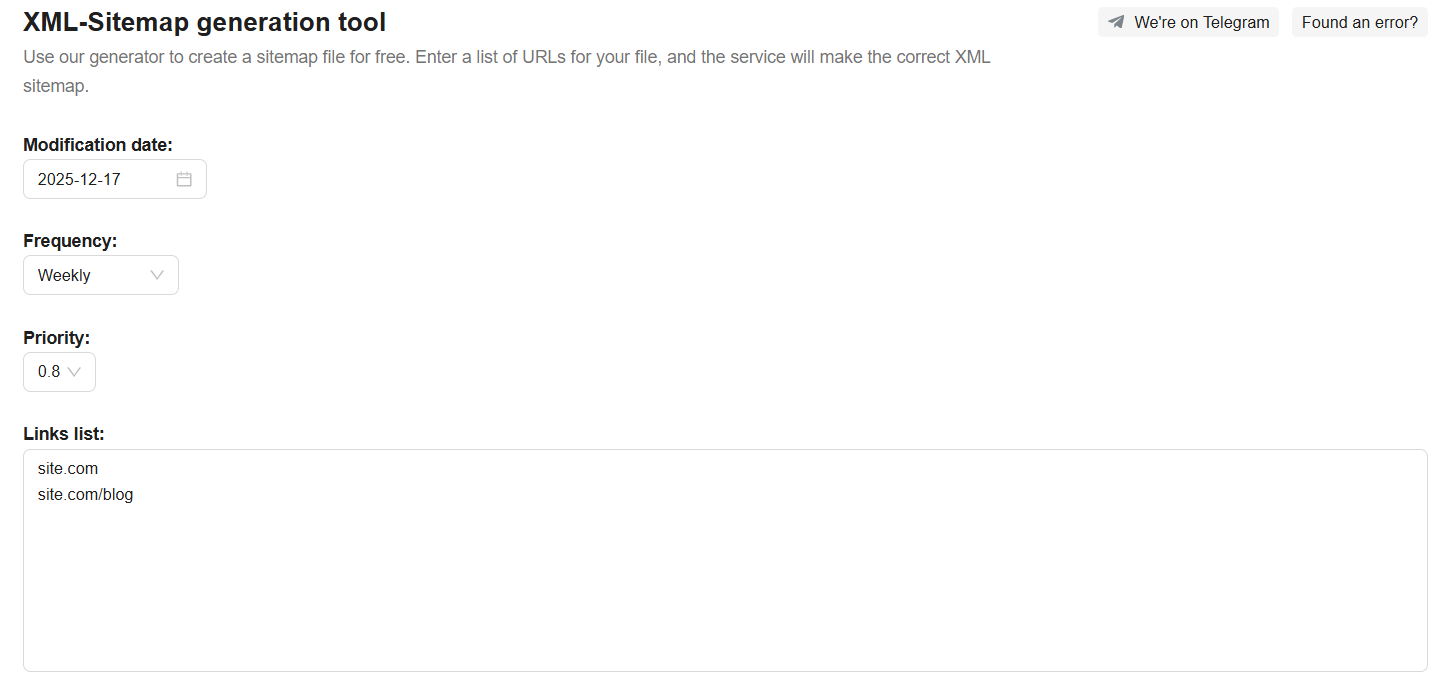 XML-Sitemap generation tool interface
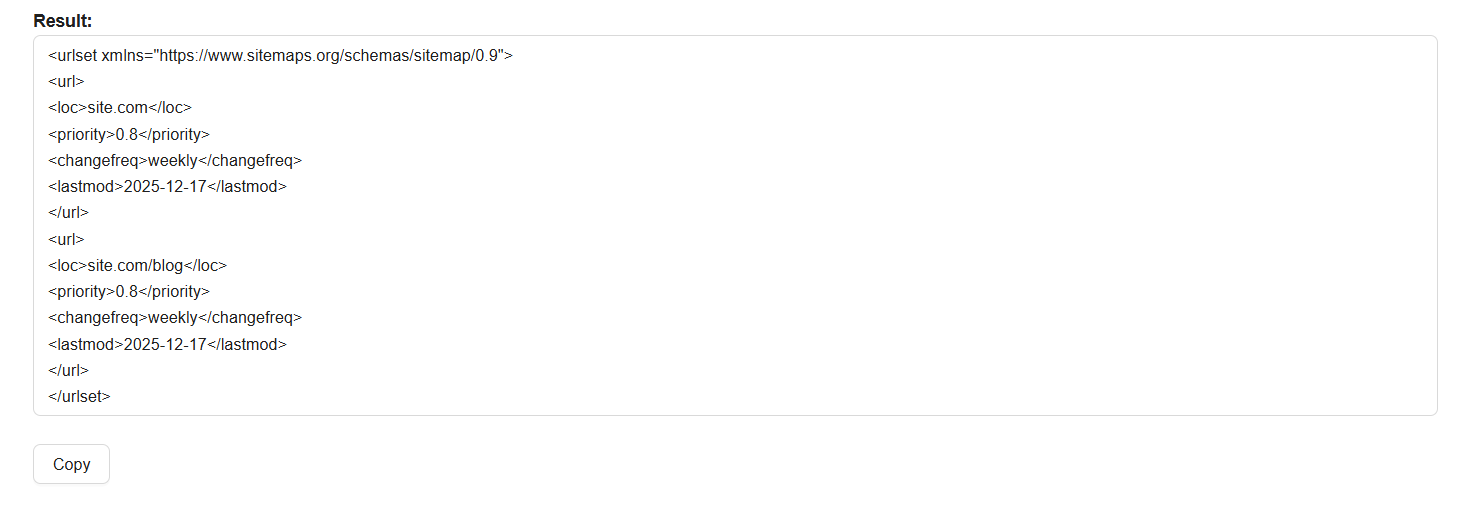 XML-Sitemap generation tool result
How to Use a Sitemap
To ensure your sitemap works effectively, search engine robots need to access the information it contains. This involves placing the file on your website and informing the robots of its location. You can do this in two ways: by specifying the path to the Sitemap in your robots.txt file or by submitting the XML file directly to the search engine. For optimal results and greater control, it's best to use both methods simultaneously.
Adding a Sitemap to Your Website
Here's a reminder of how to add a sitemap:
- Save the File in XML Format. Use only Latin letters for the file name. Common names are sitemap.xml for regular sitemaps or sitemap-index.xml for index files.
- Place the Sitemap on Your Main Domain. Ensure it is in the directory relevant to its content. If the sitemap only covers part of the site, it should not include links from other sections.
Adding the Sitemap Link to robots.txt
Once your file is in place, specify its path in the robots.txt file, which should be located in your website’s root directory. This will be sufficient for robots to locate and begin scanning your links when they visit your site.
To do this, copy the URL of the file and add it in a line with the Sitemap attribute, for example:
Sitemap: https://site.com/sitemap.xml
Submitting Your Sitemap to Google
You can also submit the sitemap directly to search engines like Google using Google Search Console. This way, the search engine robots receive an additional signal about where to find your site's structure, and you can monitor the effectiveness of the scan and track the indexed pages.
Typically, adding a Sitemap in these tools involves the following steps:
- Open Google Search Console.
- Add Your Site and Verify Access.
- Navigate to the Sitemaps Section.
- Enter the Sitemap URL in the Field and click "Submit".
All submitted XML files will be displayed in a list. Both tools show the file processing status, the number of pages found, and scanning reports. If there are errors in your Sitemap, this will be reflected in the file's status. Therefore, submitting your sitemap to Google can be helpful to check if everything is correctly filled out.
Updating Your Sitemap
Whenever significant changes occur on your site, they should be reflected in your sitemap. The current sitemap shows search engines that your site is active and being used. Therefore, it's important not only to add new pages to the sitemap for crawling but also to mark recent updates to existing pages.
Content management systems (CMS) and website builders automatically edit the sitemap as soon as you add a new page or modify an old one. To ensure this works correctly, make sure that the creation and updating of the sitemap are enabled in the settings of your CMS or SEO plugin.
If you prefer manual work, don't forget to add information about changes yourself. After editing the XML file, you can wait for the bots to visit your site again and index the new content. However, you can try to speed up this process by updating the sitemap links in search engines or replacing old files with new ones.
Replacing the Sitemap in Search Engines
A downside of crawling algorithms is that you never know when the search bot will revisit the site and index everything needed, especially if you added just one new link among several thousand already crawled.
You can restart the sitemap crawling process by removing and re-adding the link to the XML file. Essentially, search engines will consider it a new sitemap and will go through all the pages listed in it, including the new ones.
In Google Search Console, you need to go into each specific entry in the list and remove the sitemap link by clicking the three dots in the upper right corner.
Deleting Old XML Files
An alternative option is to completely replace the sitemap on your server. This will require several steps:
- Create a new sitemap file and add it to the site.
- Remove the link to the old file from robots.txt and replace it with the current one.
- Set up a 404 Not Found server response for the old file to completely close access to it.
For greater efficiency, it's also worth performing the actions described above in GSC — remove the link to the old XML file and add the new sitemap to initiate the crawling process.
Summary
A sitemap is not a guaranteed recipe for effective indexing, but it offers another opportunity to influence how search engines see you. To ensure your website is fully crawled by crawlers, create an XML file with a detailed structure, place it on your server, and add it to the tools provided by the search engines themselves.
Remember to regularly update the data within the Sitemap, include lines for new pages, and avoid mistakes and typos. A well-filled sitemap significantly increases your chances of making friends with search bots and achieving the desired search rankings.
🍪 By using this website, you agree to the processing of cookies and collection of technical data to improve website performance in accordance with our privacy policy.