
Why Pages Are Not Indexed by Google: 3 Types of Issues
Despite submitting URLs through XML sitemaps and following guidelines, some pages still fall into the "Not Indexed" category in Google Search Console.
Typically, pages may not be indexed for three reasons:
- The page does not meet Google's technical requirements for indexing.
- The page contains duplicate content: Google's canonicalization algorithm may select the incorrect canonical URL from a group of duplicates.
- Google considers the page to be of low quality.
1. Technical Requirements for Indexing
This category includes errors where Google is unable to index a page due to unmet technical requirements:
- Server error (5xx);
- Redirect error;
- URL blocked by robots.txt;
- URL marked as noindex;
- Soft 404;
- Blocked due to unauthorized request (401);
- Not found (404);
- Blocked, access forbidden (403);
- URL blocked due to another 4xx error;
- Redirect page.
It is important to note that a redirect error itself does not prevent indexing if the redirect is configured correctly. Problems typically arise with cyclic redirects or excessively long redirect chains that hinder crawling.
To meet Google's requirements for indexing, ensure the following:
- Googlebot can access the page.
- Google receives an HTTP 200 response code.
- The page contains indexable content.
When grouping errors in Google Search Console related to technical requirements, the following list emerges:
Googlebot cannot access the page:
- URL blocked by robots.txt;
- Blocked due to unauthorized request (401);
- Blocked, access forbidden (403);
- URL blocked due to another 4xx error.
Google does not receive an HTTP 200 response code:
- Server error (5xx);
- Redirect error;
- Not found (404);
- Redirect page (3xx).
The page does not contain indexable content:
- URL marked as noindex;
- Soft 404.
- Technical errors can usually be resolved by the user.
Googlebot cannot access the page
If an important page returns an error, ensure that the search engine robot can crawl it. An important page might be blocked if:
- There is a rule in the robots.txt file blocking the page from being crawled.
- The page is hidden behind a login form.
- The CDN (Content Delivery Network) partially or fully blocks the search engine robot.
You can check if an important page is blocked using the Website Analysis tool in the "Site Audit" section. The site audit shows non-canonical pages and those blocked from indexing.
Google does not receive an HTTP 200 response code
If an important page does not return an HTTP 200 response code, the search engine robot will not index it.
There are several reasons why an important page might return a status code other than HTTP 200. This could be due to the page being redirected (3xx), returning a 4xx or 5xx error. JavaScript sites may also return incorrect status codes for important pages.
Sometimes the search engine robot has not yet crawled the page, or it takes time for the reports to reflect changes made to your site. Therefore, if you know the page has been recently modified, there is no need to panic. You can check the page using the URL Inspection tool in Google Search Console.
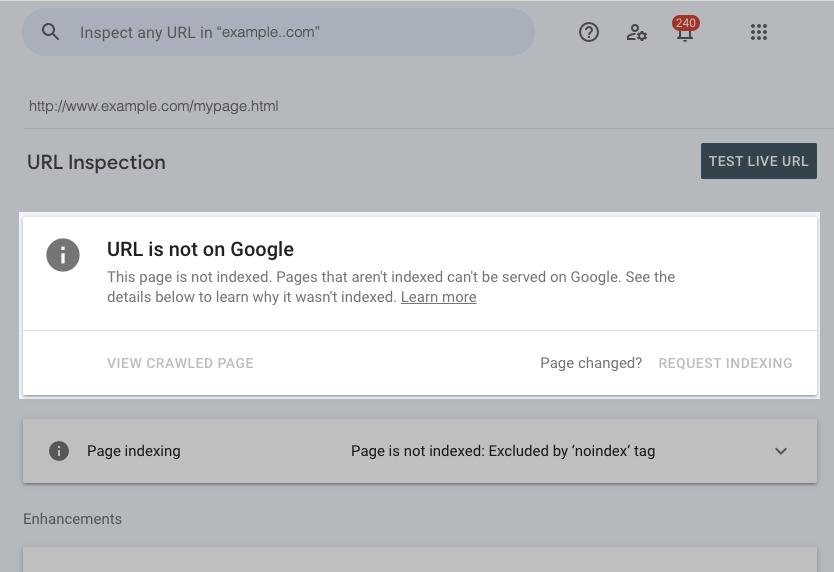
URL Inspection tool in Google Search Console
The page does not contain indexable content
If an important page has a noindex tag (in the meta robots tag or the HTTP header X-Robots-Tag), Google will not display or index this page.
Additionally, it is worth noting the Soft 404 error. If this occurs on an important page, it means that Google thinks the content on this page should return a 404 error. This usually happens when Google detects similar, low-volume content on multiple pages, leading it to believe these pages should return a 404 error.
2. Duplicate Content
These errors are related to Google's canonicalization process:
- Alternative page with the correct canonical tag: The page has indicated that another page is the canonical URL that should appear in search results.
- Duplicate without user-selected canonical: Google has identified this page as a duplicate, and since the discovered page does not have a canonical tag, Google has selected the canonical URL itself.
- Google selected a different canonical than the user: Although the user specified a different page as the canonical URL, Google chose another page to display in search results.
Why Google Might Choose a Different Canonical than the User
When Google finds duplicate pages on a site, it:
- Groups the pages into a cluster.
- Analyzes the canonical signals of the pages within the cluster.
- Selects the canonical URL from the cluster to display in search results.
This process is known as canonicalization. Google continuously evaluates canonical signals to determine which URL should be canonical for the cluster and most relevant to users. It considers:
- 3xx redirects;
- Inclusion of the page in the Sitemap;
- Canonical tag signals;
- Internal linking structure;
- URL structure preferences.
If a page was previously canonical but new signals prompt Google to select another URL in the cluster, the original page is removed from search results. This can occur even if you use the canonical tag. Therefore, it is important to ensure that canonical signals on your site are consistent for the URLs you want to appear in search results.
3. Low Page Quality
These errors are based on page signals that Google collects over time:
- Crawled – Currently Not Indexed. The page was discovered, crawled, but not indexed, or a previously indexed page is now being removed from Google search results.
- Discovered – Currently Not Indexed. A new page was discovered but has not yet been crawled, or Google is currently removing a previously indexed page from the index. It should be noted that this status can also indicate issues with the crawl budget, especially on large sites. If a site has a limited crawl budget, Google may delay the indexing of some pages.
- URL is Unknown to Google. The search engine has never seen this page or has already removed a previously indexed page from the index.
To avoid affecting those pages that are not important for indexing, it is necessary to categorize important pages into two categories:
- Indexable. Important pages that can be indexed by Google but are currently not indexed.
- Non-Indexable. Important pages that should not be indexed (for example, pages with errors 301, 404, etc.)
In conclusion
It is important to regularly check the indexing status. This will help determine which category the non-indexed pages fall into and take the necessary actions.
You can check the indexing status in Google using an online tool. Enter the list of URLs into the field, select the search engine, and start the check: the tool will assess the status of the pages and mark the indexed ones with a checkmark.
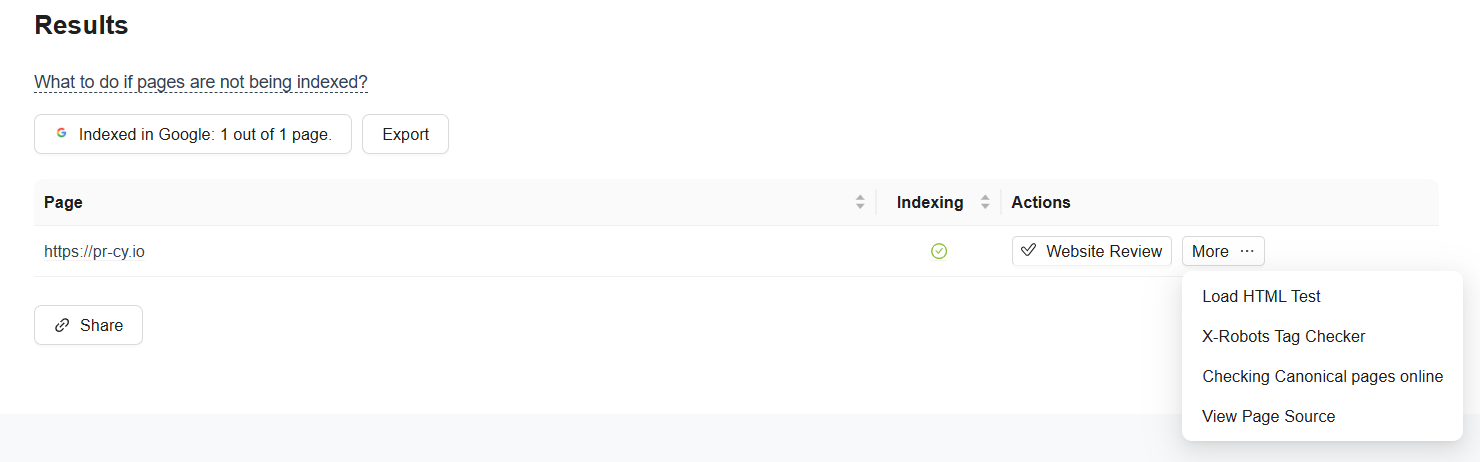
Interface of the tool checking the indexing status of a website
Detecting the problem is the first step towards solving it! Technical difficulties and duplicate content issues are generally quite solvable. They can be corrected using standard optimization methods.
Page quality issues require a more in-depth analysis. Often, they indicate more serious problems with how well the content meets the expectations of users and search engines.
🍪 By using this website, you agree to the processing of cookies and collection of technical data to improve website performance in accordance with our privacy policy.