
Optimal SEO Text Length: How Many Characters and Words Are Needed for Google
Brief summary
SEO text doesn’t have one single “correct” length. The articles that win are those that fully satisfy search intent, answer follow‑up questions, and are easy to read on mobile devices.
According to a Backlinko study of 11.8 million results, the average page in Google’s top 10 contains 1,447 words, and the length is distributed fairly evenly within the top 10. This means that what matters more than the number of characters is how thoroughly the topic is covered, the trustworthiness of the source, and the structure.
Who should read this:
- SEO specialists who create content briefs and don’t want to overpay for unnecessary characters.
- Content marketers and editors who need a clear guideline for content length and structure.
- Website owners who update old articles and want to increase CTR and search visibility.
We’ll break down how to choose the right article length for SEO, what conclusions research provides, what has changed in Google’s recommendations, how to analyze the top results, and how many characters to order from a copywriter.
Optimal SEO Text Length: What Research Shows
Usually, article length is measured in words or in characters with spaces. But for SEO, the number itself matters less than whether the text fully satisfies the query and is comfortable to read.
What the data says
Average page length in Google’s top 10. In a Backlinko study of 11.8 million search results, the average page on Google’s first page contains 1,447 words. At the same time, length is distributed quite evenly across positions 1–10, so word count alone does not give a ranking advantage.
Longer content gets more links. In an analysis of 912 million publications, longer pieces tended to earn more backlinks. This helps SEO indirectly — when the article genuinely answers questions and gets cited.
AI Overviews and search answers. Since 2024, Google has been developing AI-powered answers in search. To get into source lists, it’s more effective to add clear definitions, lists, tables, and Q&A blocks than to artificially increase text length.
How to choose article length based on intent
- Define the query type. Commercial, informational, comparison, tutorial. A service page and a detailed guide need very different amounts of text.
- Collect questions on the topic. Search suggestions, “People also ask” blocks, competitor structures, and customer support or comments provide a ready-made list of subtopics.
- Create an outline. Add new sections only where they bring meaning, examples, or steps. Fluff increases character count but reduces trust.
- Make scanning easy. Short paragraphs, subheadings, lists, tables, clear conclusions, and answers in 1-2 lines.
If you need a benchmark for a copywriter brief, take the average length from the top results plus an acceptable range, then refine the volume based on the list of subtopics. This way, you get SEO-friendly content without overpaying for unnecessary characters.
FAQ on SEO Text Length
How many words should an SEO article have?
Start with intent and the structure of the top results. According to Backlinko, the average page in Google’s top 10 is about 1,447 words, but length is distributed almost evenly within the top 10.
Is there a minimum character count required for ranking?
No. Search engines evaluate usefulness and completeness of the answer.
Do you need longreads to appear in AI answers in search?
No. AI results more often use specific fragments. Add short answers, lists, tables, definitions, and FAQ blocks.
What Kind of Texts Users Read to the End: Length, Structure, and Mobile Friendliness
Read-through rate depends not on the number of characters, but on how quickly the reader understands the value, how easy it is to scan the page, and how comfortable it is to read on a phone.
What helps people finish SEO articles
- Value in the first 5–7 lines. Formulate a clear answer to the query right away and show what’s coming next: steps, examples, a checklist, or a comparison table.
- Scan-friendly structure. Subheadings, lists, short paragraphs, highlighted takeaways, and Q&A blocks save the reader’s time.
- Mobile-first content. Make paragraphs shorter, increase line spacing, and don’t hide key conclusions at the end of a long text block.
- UX and speed. In 2024, Google updated Core Web Vitals and replaced the FID metric with INP. If a page lags when scrolling or clicking, the reader leaves before reaching your best section.
If the material turns out to be long, break it into logical blocks, add a table of contents, and include intermediate conclusions. This way, a longread feels like a series of short answers rather than one solid 20,000-character wall of text.
FAQ on Read-through Rate and Format
What’s more important for read-through rate: length or structure?
Structure. The same length can be presented as a convenient guide or as a heavy, hard-to-read block. Both search engines and readers care more about clear sections and quick answers.
How do you write long articles that people read on their phones?
Provide a short summary, split the text into H2 and H3 sections, add lists, tables, intermediate conclusions, and clearly visible steps. Remove unnecessary repetition.
How do you know an article is too long?
Check analytics: scroll depth, time on page, clicks on the table of contents, and transitions to the target action. If readers leave before an important block, move key answers higher and cut repeated points.
Google’s Recommendations for SEO Texts: Length, Usefulness, Uniqueness
Search engines do not publish strict standards for the number of characters or words in articles. Instead, they evaluate whether a page solves the user’s task, how original the content is, and what kind of experience the reader gets.
Google: Useful Content Is More Important Than Word Count
In March 2024, Google announced improvements to its ranking systems and anti-spam policies to reduce the share of low-quality and unoriginal content in search results. Fewer pages that look like they were created just to target queries, and more pages that provide genuinely helpful answers.
An SEO copywriter should not chase volume, but rather satisfy search intent and add proof. Sources, examples, step-by-step instructions, an up-to-date revision date, and transparent authorship work better than trying to reach 3,000 words by any means necessary.
Uniqueness: Authority and Duplicate Control
If a text is copied, search engines may consider a more authoritative page to be the original source. Therefore, beyond protecting your rights, it’s important to build trust in the site and in a specific article: author and editor information, links to original sources, unique data, tables, screenshots, and examples.
The situation with duplicates and rel=canonical is well explained in a comment by a Google representative. It’s a direct reminder: you can’t always prove originality using technical markup alone.
“It’s entirely possible that a copy outranks the original in the SERP. <…> There can be many reasons for this. At the same time, the rel="canonical" attribute is far from always able to indicate which version of the content should be considered the original.”
If your text has been stolen, document the fact, contact the site owner and the hosting provider, and then use legal mechanisms and the platform’s available tools.
FAQ on Search Engine Recommendations
Does Google have a requirement for the number of characters?
No. Usefulness, completeness of the answer, structure, and trust in the page are evaluated.
Will increasing the volume help if the page isn’t improving in rankings?
Sometimes yes, if you add answers to real questions and improve the structure. If you add repetition and generic phrases, increasing the volume will be a disadvantage.
How to Calculate Article Length for SEO: How Many Characters and Words You Need
Compare your content with the articles published by top-ranking competitors: this can spark interesting ideas for the content, help you understand the length that search engines have already “approved,” and ultimately make your article better.
How to analyze the length of competitors’ articles:
- Collect several top-ranking articles on the topic you’re going to write about.
- Analyze intent and format: what appears in the search results, which blocks repeat among competitors, where there are quick answers, and which questions the text covers.
- Count words or characters and record the range: minimum, maximum, and median. Keep in mind that a long text does not automatically mean a useful text.
- Collect semantics and questions: main keyword queries, formulations, terms, and entities related to the topic.
- Create an article outline and add what’s missing in the top results: examples, a comparison table, a checklist, calculations, or a case study.
Simply rewriting competitors isn’t very interesting if it doesn’t add new information. Write an article that touches on different aspects and package it in a new format — collections, meta-analyses, or guides.
You can gather competitors’ articles manually or use services — for example, a SEO content brief generator. It parses search results based on conditions, collects relevant pages, and analyzes the texts on them: counts occurrences of specified words, the number of headings and images, and text uniqueness. Based on the collected data, a brief for writing the article is generated.
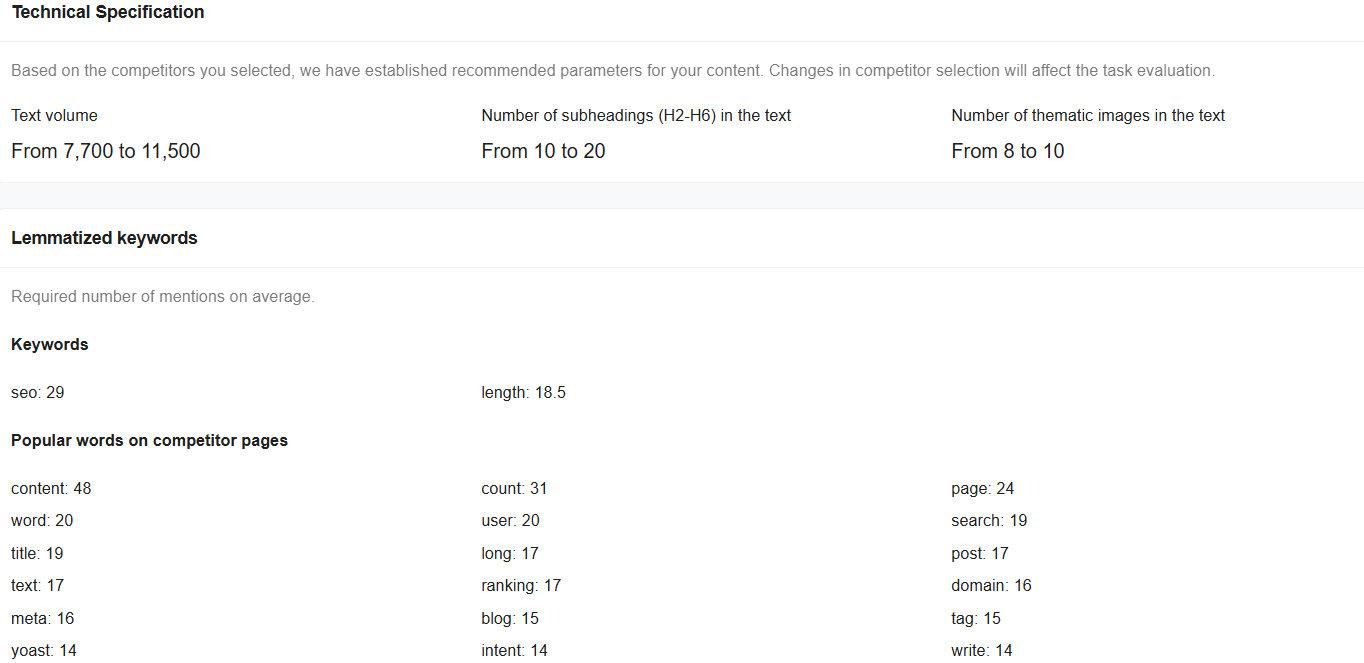 SEO Content Brief Generator Interface
FAQ on Calculating Article Length
How do you know how many characters are needed for an SEO article?
Compare 5–10 top-ranking pages for your query, record the range in words or characters, and create an outline by subtopics. If you’ve covered the intent and the questions, the length will be sufficient.
Should you focus on keyword density?
Focus on meaning and readability. Add keywords naturally to headings and answers, use synonyms and topic-related terms, and avoid repeating the same phrases over and over.
Do you need to consider AI answers in search results when planning article length?
Yes. Add short definitions, lists, and FAQ blocks. This makes it easier for individual fragments to get into AI answers and citations.
How Many Characters to Order From a Copywriter: Volume, Brief, and Structure
There’s no point in buying volume just for the sake of volume. An SEO text should cover the user intent, answer questions, and be easy to read. This can be done in 6,000 characters or in 25,000 — as long as the structure is clear and the text contains facts, examples, and conclusions.
What to include in the brief
- Page goal. Traffic, leads, education, comparison, warming up, retention.
- Audience. Who you’re writing for and the reader’s level of knowledge.
- Intent and format. Guide, checklist, FAQ, comparison, review, service landing page, blog post.
- Structure. List of H2 and H3 headings, required blocks, order of answers.
- Keywords and wording. Main and supporting queries, terms, synonyms — without keyword density requirements.
- Proof. Sources, numbers, links to documents, screenshots, examples, company experience.
- Quality requirements. Unique illustrations, no fluff, short paragraphs, fact-checking, no clickbait.
How to set volume limits
- Benchmark against the top results. Count words and characters in 5–10 competitors’ texts and define a range.
- Compare volume with the outline. If subtopics aren’t covered, add blocks. If there’s repetition, cut it down.
- Split long materials. Large guides are easier to read when they have a table of contents, interim conclusions, and separate Q&A blocks.
FAQ on Briefs and Ordering Content
What volume should be specified in the brief: words or characters?
Choose one format and use it consistently. For Russian-language projects, characters with spaces are usually more convenient. For international teams, words are more common.
Can you order a short SEO text and still get growth?
Yes, if you cover the intent, provide specifics, and answer questions. A short article that solves the user’s problem works better than a long text with no substance.
When is a long-read justified?
When the query is complex and the user has many follow-up questions. In such topics, a long-read saves time and captures more queries within a single piece of content.
How to Increase CTR and Article Visibility: Title, Snippet, AI Overviews
Search results have become more crowded: more blocks, quick answers, and AI summaries. That’s why it’s important not only to reach the top, but also to earn clicks.
- Update the Title for the query and the benefit. Add the exact query, specifics, and the year if the topic changes quickly.
- Add a small promise to the Description. In 1–2 sentences, list what the reader will get: ranges, checklists, a brief, FAQs.
- Provide a quick answer at the beginning. A summary, table, or list with conclusions helps both readers and search engines.
- Add FAQs and clear definitions. This increases the chance of appearing in featured snippets and as sources for AI blocks.
- Consider AI Overviews and AI Mode. Google has noted that links in AI Overviews can receive more clicks and lead to more diverse traffic to sites. Details are available in the AI Overviews and generative search announcement, as well as in updates about AI Mode in Search.
- Earn trust. Author name, update date, sources, examples, and unique materials reduce the risk of being affected by low‑quality filters.
FAQ on CTR and Visibility
Should you add the year to an article title?
Yes, if the topic changes quickly and readers are looking for fresh recommendations. For stable topics, the year may be unnecessary.
What affects CTR more: position or snippet?
Both matter. A strong snippet helps win clicks from neighboring results in the top 10, especially for informational queries where the SERP is packed with blocks.
How can you increase the chances of getting into AI blocks in search results?
Create separate short answers, lists, and tables, add sources, and keep the content updated. This makes the page easier to cite, even if it’s not the longest one.
🍪 By using this website, you agree to the processing of cookies and collection of technical data to improve website performance in accordance with our privacy policy.