
Rich Snippet in Google — What It Is and How to Create One
Brief Summary
A rich snippet is a search result with additional elements: rating, price, breadcrumbs, image, FAQ, and other information pulled from structured data. In this article, we’ll look at which formats are relevant in 2026, how to implement Schema.org markup, what tools to use to validate the code, and why such a result may not appear.
Who should read this:
- SEO specialists,
- owners of online stores and service websites,
- editors,
- webmasters,
- marketers,
- anyone who wants to improve CTR in Google, implement markup correctly, and avoid missing the limitations that affect how such results are displayed.
Rich Results and Featured Snippets
First, let’s clarify the terminology. In SEO blogs, you’ll often come across the term “rich snippet.” In Google’s official documentation, however, this term does not exist — instead, they use “rich result.”
Rich result
Here's a quote from the documentation: “Google uses structured data to understand the content on pages and display it as rich results.”
A rich result may include information from a single website or aggregate it from several. For example, it may show job listings for a specific location or concert announcements collected from different sources.
Rich results are generated thanks to structured data on the page, which is read by the search crawler. Different categories of websites have different structured data features available to them.
There are more than thirty types of them. In the official documentation, this is closest to Product, where the price, reviews, and other useful information from the page are displayed.
Do not confuse rich snippets with other Google blocks — such as books, recipes, airline tickets, and others — where search collects information from multiple websites.
Featured snippet
Another type of search result is the featured snippet. It is also called the quick answers box.
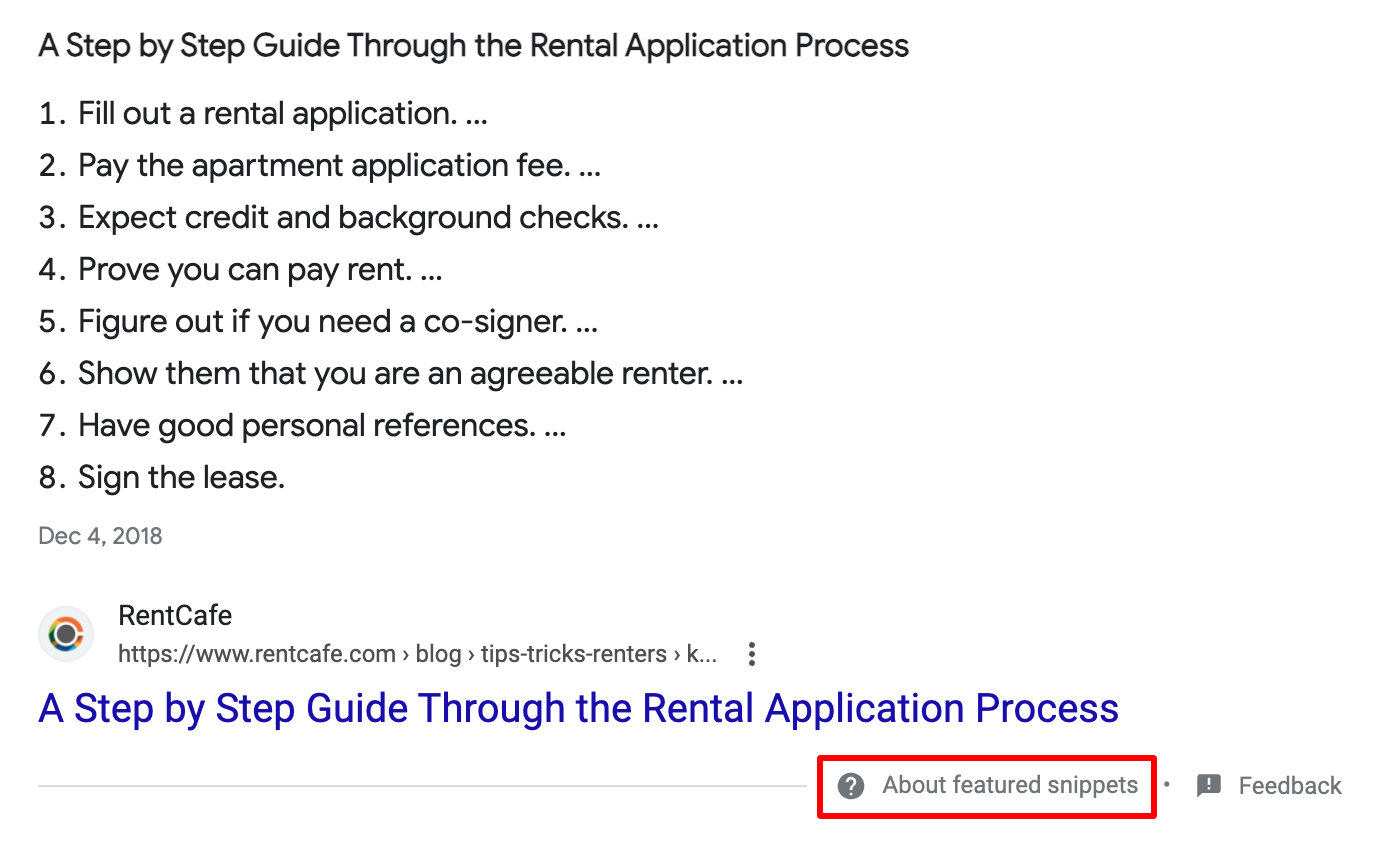
Featured snippet
This is a block that pulls in more text than a regular snippet. It may contain a paragraph from an article, a list or table, an image, or a video.
Previously, this block was called position zero because it appeared above the other search results and was highlighted with a frame. A website could appear in two places on the first search results page — both in the main results and in this block. Now, a page can appear either in Google’s special block or in the main organic results. A featured snippet is no longer position zero, but essentially the first position.
In this article, we will use the term “rich snippet” rather than “rich result,” since rich results come in many forms. By “rich snippet,” we mean a snippet at any position in the search results that contains additional information.
What Is a Rich Snippet
A rich snippet is an enhanced search result in Google that contains more information than обычные “blue links” and looks more attractive to the user. It shows additional website content that the search crawler takes from the page’s structured data.
A rich snippet can be considered one of the types of enhanced search results.
What information is displayed in a rich snippet
The additional content depends on the type of structured markup used on the page. A rich snippet may include:
- rating;
- price;
- reviews;
- lists;
- additional links;
- questions and answers;
- emoji;
- pictures;
- breadcrumbs;
- image.
Why rich snippets are needed
The main purpose of rich snippets is to attract more traffic to a website. Two factors influence this:
- The search crawler gets more information to determine the page’s relevance and is more likely to show such a page in the search results;
- Users are attracted by the details and specifics of your offer, which increases CTR.
In addition, the more detailed the page description in the search results, the more targeted visits it gets and the lower the bounce rate.
Rich snippets themselves are not ranking factors, but CTR is.
Researches
Rich snippets are not a new phenomenon, and website owners try to obtain them for as many pages as possible, so their effect has long been studied.
Milestone Inc. analyzed more than 4.5 million queries and found that users click on rich results in 58% of cases, compared to a 41% CTR for regular results. Different types of rich results received different numbers of clicks (some up to 87%), but in any case more than regular “blue links.”
In 2023, Getstat conducted a study showing that 48.11% of all results had at least one rich snippet among the top 20 search results.
Then they analyzed the first 100 results and calculated which type of information appears most often in rich snippets:
- Ratings — 7.83%.
- Price — 4.5%.
- FAQ — 1.89%.
- How-to — 0.15%.
It is worth noting here that pages reach the top of the search results not only because of rich snippets, but primarily because they are well optimized from the start.
How to Create a Rich Snippet for a Website Page
The main thing to know is that there is no guaranteed way to get a rich snippet. But you can improve your chances.
A page should meet several requirements:
Query. Google does not show rich snippets for every query, because not all types of pages can use structured data that results in this kind of snippet. Also, when generating search results, user location and device type are taken into account.
Accuracy of information. The Title and Description should accurately describe the page content without keyword stuffing.
Website code. It must comply with Google’s requirements.
Content quality. A page on a site that Google may consider spammy will not get a rich snippet. Even if the page is not considered spam, the overall level of SEO optimization strongly affects the chances of getting an attractive snippet in search results.
Structured Data
Structured data is responsible for creating elements of a rich snippet. It is visible only to search engine crawlers and does not change the appearance of the page for users. With its help, crawlers understand what information is available, where it is located, and how it can be used.
The structured data schema depends on the type of page and the website’s field of activity. For example, on an online store page, you can mark up:
- images;
- address;
- business hours;
- product rating;
- number of reviews;
- product availability;
- size, color, and other product characteristics.
When you implement structured data on your website pages, you are essentially using a schema in the form of markup code.
A schema is a vocabulary that tells the search engine about the elements on your page.
A format is the type of markup code that passes the schema to the search engine. There are three main markup code formats: JSON-LD, Microdata, and RDFa. Google recommends using JSON-LD.
The most popular standards are Schema.org and Microformats.org. There is also Open Graph, but this structured data is used to create website previews on social media, so we will not discuss it here.
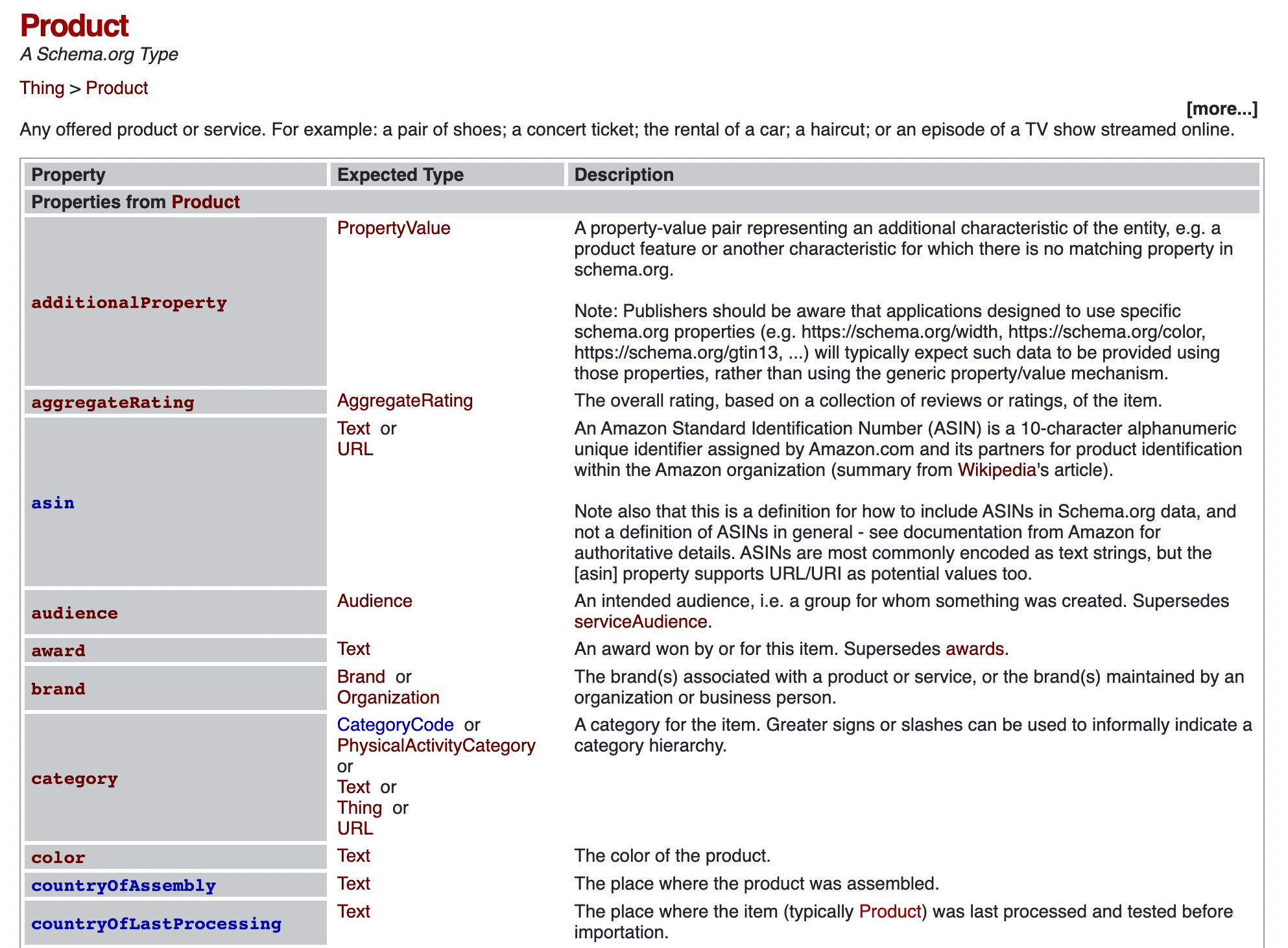
Markup for the Product category from Schema.org
How to implement structured data for a rich snippet
Overall, the process is the same as for any other page. In Google’s structured data documentation, they recommend focusing on the specific rich result type in Search Central and using JSON-LD as the primary format. Some Schema.org properties are not required by Google, but they can still be useful for other search engines, assistants, and internal services.
1. Choose the snippet type
Google supports several dozen structured data types, but the set of formats that are actually noticeable in search results is no longer as broad as it was a few years ago. For a typical result like this, the most suitable types are usually Product, Review, Recipe, Breadcrumb, Organization, Article, VideoObject, JobPosting, and Event. You should choose the type based on the actual content of the page, not on the appearance you want the search block to have.
If a page contains several types of content, you can mark them up differently. For example, if you have a sugar cookie recipe with a step-by-step instruction list, the same recipe in video format, and a photo gallery, you can add structured data for different types. Then all three kinds of content may appear in rich results for different queries: “step-by-step sugar cookie recipe,” “sugar cookie recipe video,” and others.
2. Study the requirements for the selected type
Each type has a separate page with requirements. It is worth checking this before implementation: Google regularly уточняет required and recommended properties, and some formats may lose priority in search results. Be sure to also check the current status of FAQ and HowTo. After the reduction of their visibility in 2023, these schemas can no longer be considered a reliable way to get a prominent SERP block.
On the page for each type, Google usually shows schematically how the snippet may look in search results.
3. Create the structured data code and add it to the site
It is best to build the markup code based on the current Google Search Central and Schema.org documentation. For most websites in 2026, the best option is JSON-LD embedded in the page template or delivered through the CMS. If data such as price, availability, rating, or author changes automatically, the code should also be updated automatically; otherwise, it will quickly stop matching the content.
4. Check the results
The created code can be checked in the Schema.org validator.
To make sure the page is eligible for rich results display, use Google’s testing tool. Enter the page URL and wait for the check to finish. You can choose desktop or mobile display.
After adding structured data, you need to request reindexing through Search Console.
Services for generating structured data code
This service supports JSON-LD. Here, you need to manually enter the markup tag values depending on the page type. As a result, you will also get the code that needs to be added to the page.
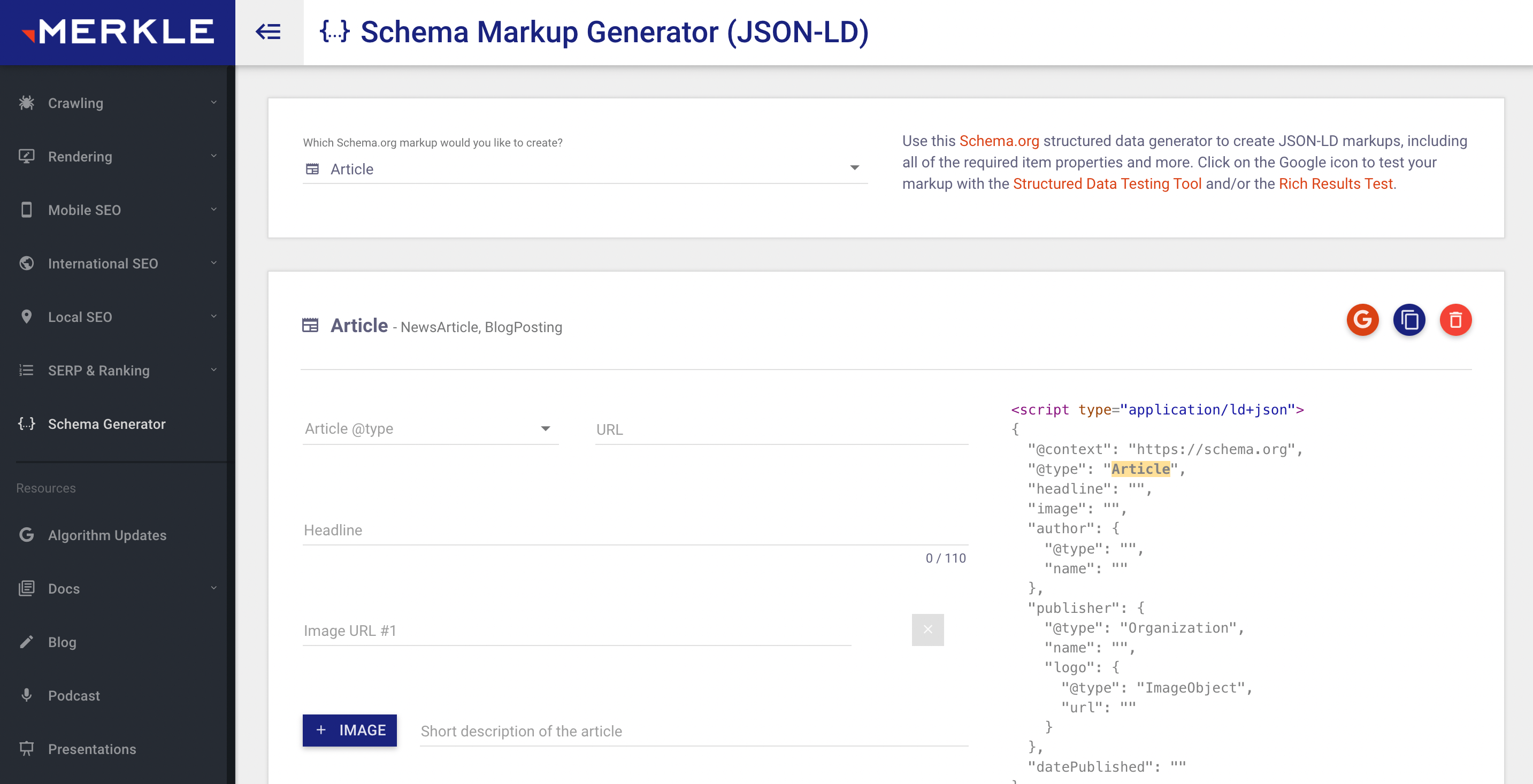
JSON-LD Schema Generator For SEO
This service has fewer markup types, but it includes the main ones: product, business, person, website, event, website. To get the code, you need to choose the required type and fill in the fields.
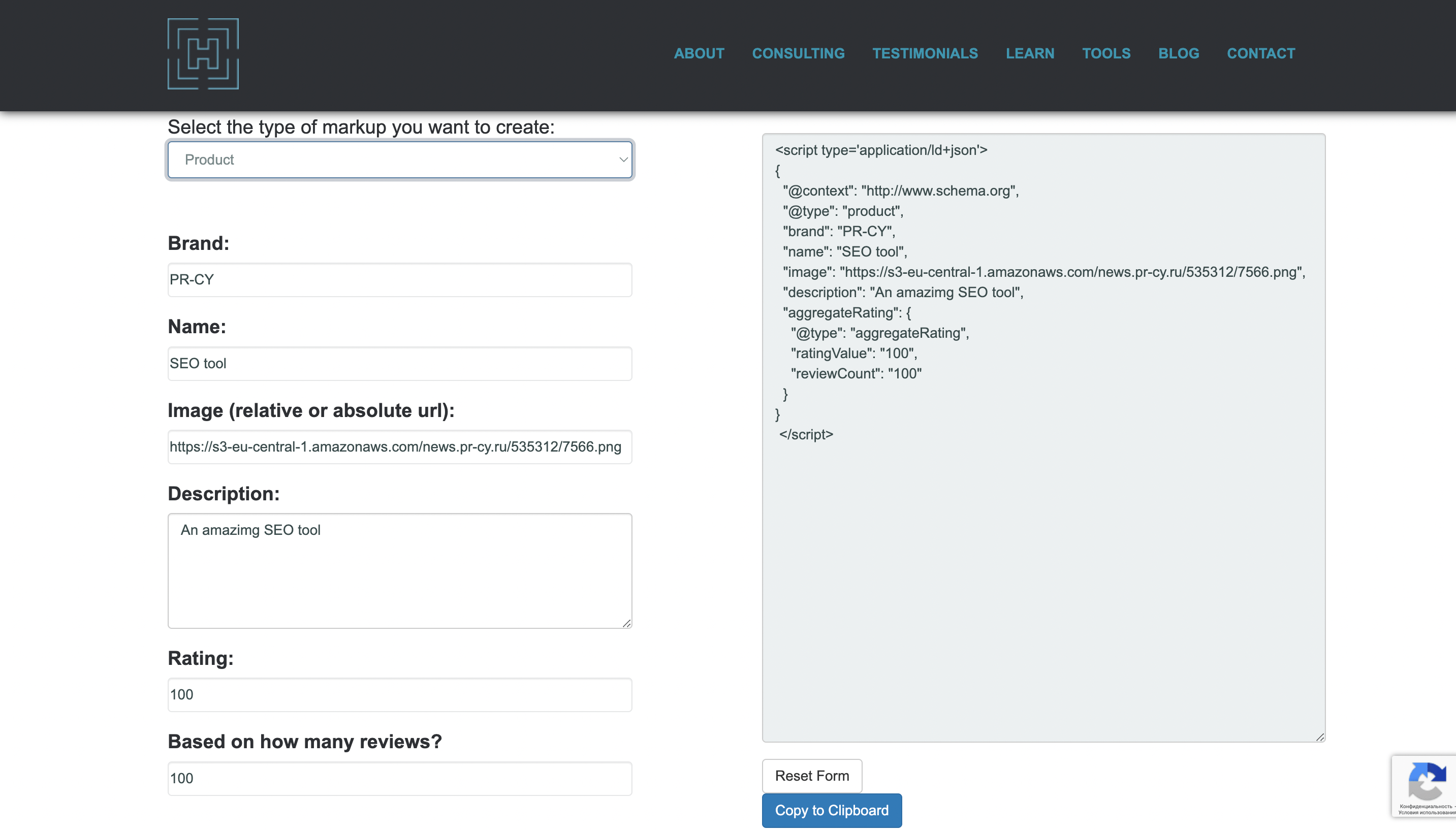
If your site runs on a ready-made CMS, there are special plugins available.
Remember that structured data should be placed not only on the canonical page, but also on all pages where its content is duplicated.
Why a Rich Snippet May Not Appear
Even if you did everything correctly, a page still might not get a rich snippet. There are several reasons for this:
No one promised it in the first place. The documentation states that “Google does not guarantee that your content will appear in search results, even if the Rich Results Test did not detect any errors.” A page’s appearance in search is influenced by many factors, not just your efforts.
Syntax errors. It’s easy to make a mistake, so it’s better to use dedicated tools and validate the code with a validator.
Conflict between formats. All structured markup should be in a single format. If you add new code, the old code should be removed. Google recommends using JSON-LD together with Schema.org.
Problems with the website or the page. Any technical issue can ruin your rich snippet. The crawler may fail to read the page information correctly and show something in search results other than what you intended.
The content on the page does not match the selected markup type. For example, if you decide to mark up an article as FAQ or an event listing as a livestream.
The structured data lacks enough properties. For example, for a recipe page there are required properties such as image and name. The rest, according to the documentation, are considered recommended, but it is better to add as many of them as possible. If the search crawler decides that the additional properties are not sufficient to display a rich snippet, it will show a regular one.
Google has not crawled the page yet. After implementing structured markup, you need to wait a few days, or better yet, submit the page for reindexing right away. And one obvious thing — make sure the page is actually open for indexing.
Part of the content is inaccessible. Google includes in rich results only those pages that are available to everyone without paid subscriptions or other restrictions.
In 2026, Google became more cautious about showing visually rich results in cases where the data looks incomplete, automatically generated, or weakly supported by the page content. That is why it is especially important here that the schema, the text, the page interface, and the commercial terms do not contradict one another.
If we are talking about product cards, separately check that the currency, discounted price, availability, brand, rating, and number of reviews match both in the markup and in the interface. For articles and recipes, pay attention to the date, author, image, headline, and content structure. These inconsistencies often do not trigger an obvious validator error, but they can still prevent the additional block from appearing.
Do you need a rich snippet? Absolutely yes. It will attract more users to the site and improve its ranking in search results. If it does not work for your pages, see whether you can qualify for other types of rich results.